
On 20 November 2026 at 2:35 a.m. MST, Edward Sturm posted an "Easy SEO hack" on X (Edward Sturm on X). You open Performance in Search Console, add a Query filter, choose Custom (regex) and paste ^(?:\S+\s+){7,}\S+$. He credits the pattern to @askOkara. Okara, an AI SEO tool vendor, posted the same pattern on 2 November 2026 and wrote, "It shows every search with 8+ words" (Okara on X). As of about 5:38 p.m. MST on 20 November 2026, Okara's post had 202,601 views and Edward's had 33,153.
The pattern is a good start, and it's one pattern in one filter. Many Search Console regex guides cover single patterns like this one. Fewer cover what happens when you combine patterns or stack filters: OR, AND and "but not," where each one works in Search Console, and where each one breaks.
Every pattern in this article was tested in RE2 on sample strings we wrote, using Go's regexp package and Google's C++ RE2 library. None was tested in a live Search Console property. Run each one on your own export before you rely on it.
Learn how regex in Search Console reads a pattern
Four rules from Google's help page on filtering decide what a combined pattern returns (Google Search Console Help).
Google says, "The RE2 syntax is used." RE2 is Google's own regex library, and it leaves out some features that other regex tools have.
Google calls the default a "partial match," meaning a pattern can match anywhere in the query or URL unless you add ^ for the start or $ for the end. Because of that, seo and .*seo.* return the same rows, and the extra .* does nothing.
Case is ignored by default, and Google says, "Default regex matching is not case-sensitive." In April 2021, Google's help said the opposite: "Default matching is case-sensitive," with a suggestion to add (?i) (Google help, Web Archive copy, 23 April 2021). Adding (?i), as older guides suggest, does no harm, and you don't need it. The switch that changes results is (?-i). Google says it makes the match case-sensitive.
A filter is a yes/no test on each row. Capturing groups like (\S+\s+) and non-capturing groups like (?:\S+\s+) give the same rows. Okara's cheat sheet uses the capturing form ^(\S+\s+){7,}\S+$, and it returns the same matches as the version in the posts (Okara on X).
Plan around the Search Console regex limits
RE2 has no lookahead or lookbehind. Google's RE2 syntax page marks (?=re), (?!re), (?<=re) and (?<!re) as "NOT SUPPORTED," along with backreferences and possessive repeats (RE2 syntax). It also says RE2 will "reject forms that create a minimum or maximum repetition count above 1000." In our RE2 tests, boiler(?!cover) and ^(?!.*free).* were both rejected.
An invalid pattern can look like zero searches. Britbunch, a UK agency, says it pasted boiler(?!cover) into a live property on 21 October 2026 (Britbunch). It reports that "The dialog accepted it with no warning," and the report showed "0 clicks, 0 impressions and no rows, with no error message." That's Britbunch's test, not a Google statement. When a filter returns nothing, check the pattern before you decide nobody searched for it.
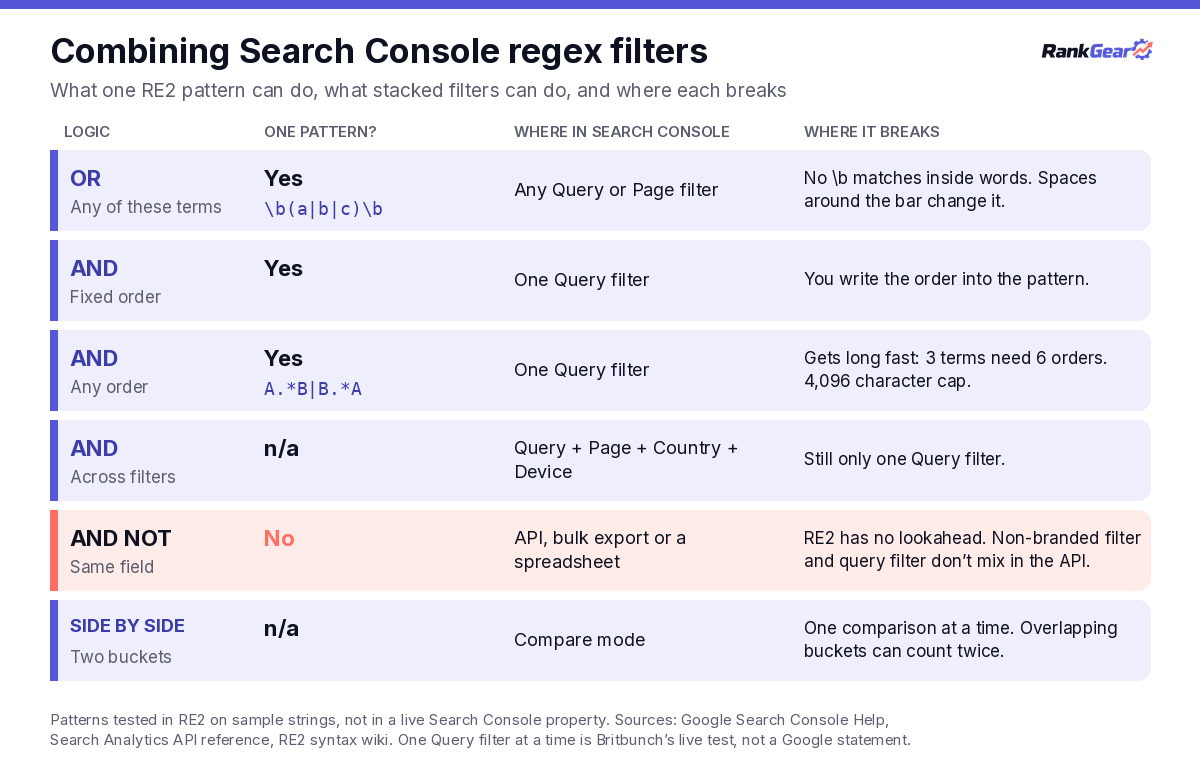
The interface also seems to allow one Query filter at a time. Britbunch reports that adding a second Query filter reopened the first one. It writes, "One Query filter at a time is the rule, although a Query filter and a Page filter can be combined." We found no Google page that states this rule. Length is the last cap: Google's API reference lists "Max length 4096 characters" for each filter (Search Analytics API). Britbunch says the regex box in the interface stops at 4,096 too, and that it read that figure "from the box itself."
Write OR logic into one GSC regex filter
OR is the easy part: a vertical bar separates options, and one Query or Page filter can hold a long list. Google's help says that for multiple values you should "separate them with a vertical bar (|) and surround the whole expression with parentheses."
Add word boundaries to Search Console regex patterns
Partial matching lets short OR lists match inside other words. Google's June 2021 post on the "Doesn't match regex" option suggested what|how|when|why for question queries (Google Search Central Blog). In our RE2 tests, that pattern matched "seo showroom," "somehow ranking dropped" and "whatsapp seo."
Anchors and word boundaries fix most of this. The pattern below needs a question word at the start of the query, followed by a word boundary:
^(who|what|whats|what's|when|where|why|which|how|can|does|do|is|are|should|will)\bIn our tests it matched "what's a good ctr" and "is seo dead." It rejected "however seo," "whatsapp seo" and "island seo agency." It also rejected "seo how to," because the question word isn't first. That's a design choice, and you can drop the ^ if you want questions that start later in the query and can live with more false matches.
Three other mistakes come up often:
- Spaces around the bar. RE2 treats a space as a character to match, and Google's help template shows a space on each side of the bar. In our tests,
(seo audit | rank tracker)missed "seo audit" and "rank tracker" and matched "free seo audit tool." Write|with no spaces. - Wildcards that reach too far. A brand pattern in a 2022 Search Engine Journal guide,
.*facebook.*|face*book.*|fb.*|fbook.*|f*book.*, matched "notebook" and "fbi jobs" in our tests (Search Engine Journal). In the same guide,review*means "revie" plus any number of w's. - Accents next to a boundary. RE2's syntax page describes
\bas an "ASCII word boundary." In our tests,\bcafé\bmissed "café near me." Use\bcaf[eé]instead, and expect it to match "cafeteria" too.
Build intent buckets with Search Console regex patterns
These OR patterns sort queries by intent, and each one passed our RE2 sample tests.
- Comparison:
\b(vs|versus|alternatives?|compare[ds]?|comparison|competitors?)\bmatched "semrush vs. ahrefs" and rejected "vsco seo." - Commercial:
\b(best|top|cheap(est)?|pricing|prices?|costs?|reviews?|software|tools?|services?|agency|agencies|hire|quotes?)\brejected "stop," "toolbar" and "costume." A 2022 SEJ pattern without boundaries,.*(best|top|alternate|alternative|vs|versus|review*).*, matched "stop." - Problem:
\b(fix|fixing|error|not working|issue|problem|broken|won[’']?t|can[’']?t|doesn[’']?t)\bhandles straight and curly apostrophes. - Year:
\b20[2-3]\d\bmatches any year from 2020 to 2039. - Near me:
\b(near me|nearby|open now|closest|in my area)\brejected "near meta tags" and "nearbyte."
The buckets overlap. In our tests, "best rank tracker 2026" landed in both the commercial and the year bucket. Report each bucket on its own, and don't add their totals together.
Put AND logic inside one regex query filter
One pattern can hold AND logic in two cases: the parts sit in a fixed position, or you list every order they can appear in.
Combine question and length Search Console regex patterns
Okara's two tips, a question word and 8+ words, fit in one filter because both conditions are positional. The question word comes first, and the length counts from there:
^(who|what|when|where|why|which|how|can|does|is|should)\b(?:\s+\S+){7,}$In our tests it matched "how do i get my small business to show up in google maps." It rejected "how to fix crawled currently not indexed," which is too short. It also rejected "best seo tool for a small agency with ten clients in phoenix," which is long and has no question word at the start.
The length pattern counts tokens. ^(?:\S+\s+){7,}\S+$ matches 8 or more runs of non-space characters, and "5-page" counts as one of them. In a reply to Edward, @HeyEthanLiu wrote that the pattern "matches eight or more whitespace-separated terms, not necessarily questions" (reply on X).
Match any order with multiple regex patterns in GSC
When the order can change, write both orders and join them with a bar. This pattern finds a competitor name and a comparison word in either order:
\b(semrush|ahrefs|moz)\b.*\b(vs|versus|alternatives?)\b|\b(vs|versus|alternatives?)\b.*\b(semrush|ahrefs|moz)\bIt matched "rankgear vs semrush" and "alternative to moz," and it rejected "semrush pricing." The same shape works for local service queries:
\b(plumber|plumbing)\b.*\b(tempe|mesa|chandler)\b|\b(tempe|mesa|chandler)\b.*\b(plumber|plumbing)\bIt matched "mesa az plumbing repair" and rejected "mesa grill." City names that are also everyday words need pinning to a state, and \bglendale,?\s+(az|arizona)\b matched "seo glendale az" and rejected "seo glendale ca."
The cost is length. Two terms need two orders, and three terms need six. The competitor pattern above is 111 characters, and long lists get close to the 4,096-character limit quickly.
Combine regex filters in Search Console across query, page, country and device
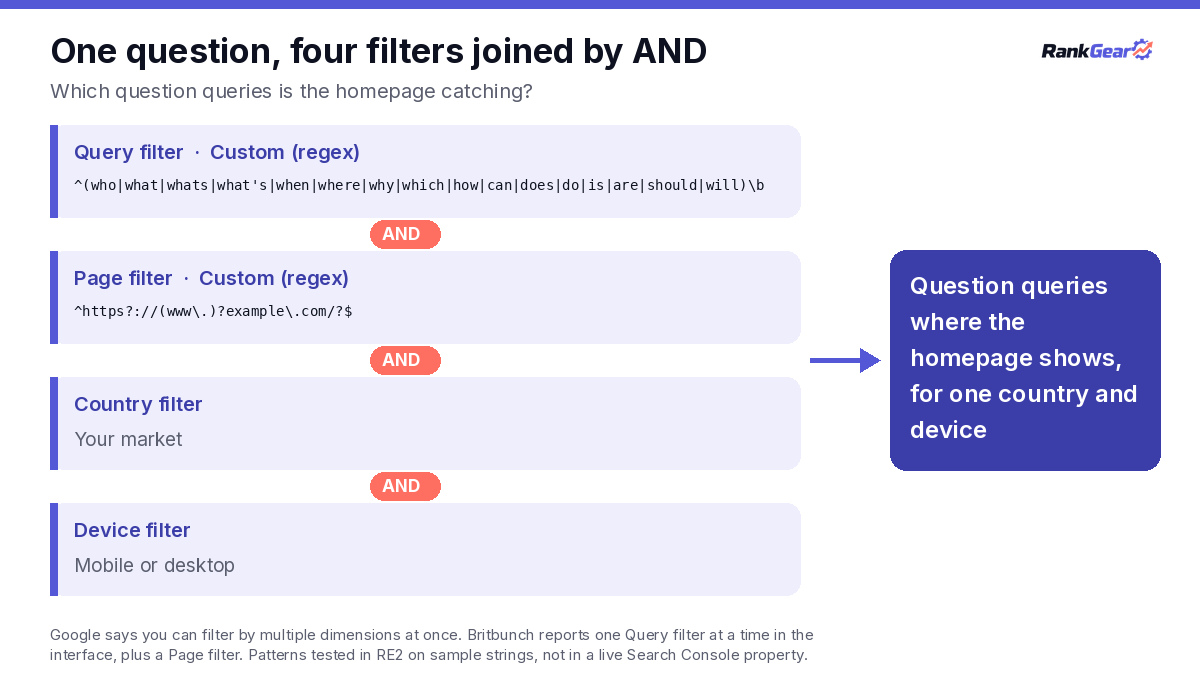
Google says, "You can filter data by multiple dimensions simultaneously," and its example joins a country and a device with AND. A Query regex, a Page regex, a Country filter and a Device filter all narrow the same rows.
Replies to Edward's post point to one useful stack. @williamcworthy suggests checking the Pages tab for each long query (reply on X). He wrote that "if it's the homepage, that question usually deserves its own section or page." You can see all of those at once with the question pattern above in the Query filter and this one in the Page filter, using your own domain:
^https?://(www\.)?example\.com/?$Page values are full URLs. In our tests, ^/blog/ never matched https://example.com/blog/post/, and Britbunch reports the same result in a live property. To cover several folders, /(blog|guides|learn)/ matched blog and guide URLs and rejected "/blogging-tips/."
Compare two Search Console regex filters side by side
Compare mode puts two sets of rows next to each other. Google's April 2021 launch post says "the comparison mode now supports the new regex filter for queries and pages" (Google Search Central Blog). Google's current help says, "You can have only one comparison at a time."
Overlap applies here too, since a query that matches both patterns can count on both sides. We haven't checked how the current interface shows those rows. Test it on your own property first.
Handle AND NOT logic with GSC regex filters
"But not" is where Search Console runs out. Say you want question queries that don't mention your brand. RE2 can't express that in one pattern, because it needs a lookahead. The interface gives you one Query filter, and you can use "Doesn't match regex" for the brand or the question pattern for questions, not both at once.
Google's built-in branded filter doesn't solve this either. Google's help says to "select the Query filter" and "Choose either Branded or Non-branded" (Google Search Console Help). Edward's video shows "Non-branded queries" in the same dropdown as Custom (regex). Google's API reference says filtering or grouping by branded classification can't be combined with a query filter in the same request. We didn't test whether the interface allows it.
The branded filter also works differently from regex. Google says the classification "is NOT based on a regular expression" and is "determined by an internal, AI-assisted system" (Google Search Central Blog). Google adds that "some queries may occasionally be misidentified." A brand regex keeps the list in your hands. This example handles spacing and a few misspellings, and you'd use it with "Doesn't match regex":
\b(rank[\s-]?gears?|rnk ?gear|rankgaer|rank ?geer)\bUse the API or an export when a GSC regex filter runs out
You have four ways to get "but not."
- The API. In the Search Analytics API, a filter group of type "and" means "All filters in the group must return true." The "one or more" option is marked "(not yet supported)." The operators include
includingRegexandexcludingRegex. Google's reference doesn't forbid twoqueryfilters in one group. An include pattern plus an exclude pattern should give you "but not," and we haven't tested this on a live property. - The bulk export. Suganthan Mohanadasan ran his numbers from the BigQuery bulk export (Suganthan Mohanadasan). There, both conditions can sit in one SQL query.
- A spreadsheet. Export with one filter applied, then filter out the rest in a sheet. Britbunch suggests exporting for "contains A but not B." The 1,000-row export cap applies.
- The Page filter. If the rows you want to drop land on known URLs, a Page filter can stand in for the second Query filter. That changes the question from queries without the brand to queries landing outside those pages, and your report should say so.
Read combined Search Console regex filter totals with care
A filter decides which rows you see, and it doesn't tell you how much traffic a bucket has. Google's help warns that filtering by query or URL "can affect the report totals due to data truncation and the omission of anonymized queries."
Anonymized queries drop out first. Google says they "aren't issued by more than a few dozen users over a two-to-three month period" (Google Search Central Blog). They're "included in chart totals, unless you filter by query." In Google's own example, queries containing "fiction" had 175 clicks and queries without it had 275. Together that's 450, against 550 in the chart total.
Long and rare queries are the ones most likely to be hidden. Suganthan Mohanadasan reports that over 59 days, "57.7% of my web impressions carry no query string at all." That was 454,720 anonymized impressions against 333,651 visible ones. It comes from one property, and it works as an example, not a benchmark.
Row limits shape what you can export. Google says, "The maximum you can export through the Search Console user interface is 1,000 rows." The API limit is "50,000 rows per day per site per search type." QueryWatch says "a filter gives you a different 1,000 rows" (QueryWatch). We haven't tested that claim. If it holds, length bands that don't overlap would export more of the long tail:
- 1 to 2 words:
^\S+(?:\s+\S+)?$ - 3 to 4 words:
^(?:\S+\s+){2,3}\S+$ - 5 to 7 words:
^(?:\S+\s+){4,6}\S+$ - 8 or more words:
^(?:\S+\s+){7,}\S+$
No query falls into two bands. The middle bands also answer a point @ashgeeky made in a reply to Edward: "On smaller sites the 8+ word list is often tiny" (reply on X).
Two more limits apply to every row. Google says the table position is "the average position in Search results for the specific URL or grouping dimension shown in the table row" (Google Search Console Help). Google also says "it's recommended to focus more on trends in impressions and clicks than on position alone." Results vary by person as well, since Google says "Search results are specific to the time, place, device, and recent history of the person searching." Our guide to Search Console export limits in AI SEO audits and our notes on reading a Search Console screenshot cover more of these limits.
Check where long regex query filter matches come from
Edward's video says these long queries are the same kind of questions people ask ChatGPT. Length alone doesn't show where a query came from.
Google says, "If a user asks a follow-up question within AI Mode, they are essentially performing a new query" (Google Search Console Help). AI Overviews and AI Mode are reported within the "Web" search type (Google Search Central). That means short queries can be AI Mode follow-ups. Suganthan Mohanadasan found reply fragments like "yes go on" in Search Console and filters them with ^(yes|yeah|ok|okay|sure)[?!.,]*$. As published, that pattern misses "yes go on" itself in our tests, and it catches "ok!"
Chris Long used a 10+ word pattern, ^(?:\S+\s+){9,}\S+$, in Search Engine Land on 27 February 2026 (Search Engine Land). He wrote, "we don't have direct evidence that these types of queries are directly from ChatGPT, AI Mode or any other AI platform." A long query is a long query until something else shows where it came from.
Turn GSC regex results into page decisions against the live SERP
Edward's post gives two next steps. The first, quoted from Okara, is to answer the long questions: "Answer them at the top of your page that already ranks." The second is Edward's own: his video says to "add in your desired keyword at the top," and his post says you'll then rank for more high-volume keywords. That second step is his claim, and it's worth testing before you adopt it.
Google's spam policy gives you a reference point for that test. Google says, "Keyword stuffing refers to the practice of filling a web page with keywords or numbers in an attempt to manipulate rankings" (Google Search spam policies). Its examples include "Blocks of text that list cities and regions that a web page is trying to rank for." Use the city patterns above to study your data. They aren't a list to paste onto a page.
Answering the question is the safer test. Open the page that ranks for the query, check the live results for that query, and note what the top pages answer. Then write the answer, and measure clicks and impressions over a full date range before and after. One rise after one edit doesn't show the edit caused it, and our guide to correlation vs causation in SEO explains why.
Check regex query filter finds in RankGear
This article does not claim RankGear connects to or imports Search Console data. Once a regex filter has surfaced a question worth acting on, you can run that query through RankGear to see what the pages ranking for it do.
RankGear's Content Intelligence lists "Questions & Question Plan," described as "The questions the field answers, organized into a plan you can write against" (RankGear Content Intelligence). Its Answered Question Heading Rate factor reports "the share of detected question headings immediately followed by a substantive answer." The same page says "word count does not establish correctness" (RG-HLP-014). Headings Has Question "relates to how top-ranking pages tend to be structured rather than causing a page to rank" (RG-RDB-004).
Copy tested Search Console regex patterns
Each pattern below was tested on sample strings with Go's regexp package and Google's C++ RE2. None was tested in a live Search Console property, and each one should be checked on your own export first.
- 8+ words (Okara's):
^(?:\S+\s+){7,}\S+$. Pair it with the Pages tab. It counts tokens, not words. - 5 to 7 words:
^(?:\S+\s+){4,6}\S+$. Use it when the 8+ list is small. - Question start:
^(who|what|whats|what's|when|where|why|which|how|can|does|do|is|are|should|will)\b. Pair it with the homepage Page pattern. It misses questions that start later. - Question and 8+ words:
^(who|what|when|where|why|which|how|can|does|is|should)\b(?:\s+\S+){7,}$. One filter does both jobs. - Comparison:
\b(vs|versus|alternatives?|compare[ds]?|comparison|competitors?)\b. It overlaps with the commercial bucket. - Competitor and comparison, either order:
\b(semrush|ahrefs|moz)\b.*\b(vs|versus|alternatives?)\b|\b(vs|versus|alternatives?)\b.*\b(semrush|ahrefs|moz)\b. Swap in your own competitors. - Commercial:
\b(best|top|cheap(est)?|pricing|prices?|costs?|reviews?|software|tools?|services?|agency|agencies|hire|quotes?)\b. It overlaps with comparison and year. - Problem:
\b(fix|fixing|error|not working|issue|problem|broken|won[’']?t|can[’']?t|doesn[’']?t)\b. Keep both apostrophe types. - Year:
\b20[2-3]\d\b. It matches 2020 to 2039. - Near me:
\b(near me|nearby|open now|closest|in my area)\b. Pair it with the Country filter. - Service and city, either order:
\b(plumber|plumbing)\b.*\b(tempe|mesa|chandler)\b|\b(tempe|mesa|chandler)\b.*\b(plumber|plumbing)\b. Pair it with the Country filter. - City pinned to a state:
\bglendale,?\s+(az|arizona)\b. Use it for city names that are also common words. - Brand and misspellings:
\b(rank[\s-]?gears?|rnk ?gear|rankgaer|rank ?geer)\b. Use it with "Doesn't match regex." - Exact list:
^(seo audit|seo audit tool|technical seo audit)$. Anchors at both ends turn partial matching into exact matching. - AI Mode reply fragments (Suganthan's):
^(yes|yeah|ok|okay|sure)[?!.,]*$. As published, it misses "yes go on." - Homepage only:
^https?://(www\.)?example\.com/?$. Use it in the Page filter with your domain. - Several folders:
/(blog|guides|learn)/. Use it in the Page filter.
Use regex to sort your Search Console data, then check each find against the live SERP and the page before you change anything.
Search Console regex FAQs
Can you use two regex query filters in Search Console?
Britbunch reports that the interface allows one Query filter at a time, plus a Page filter, and we found no Google statement of that rule. Google's API reference ANDs filters inside a group, and the API may allow two query filters there. We haven't tested that, and the details are in the AND NOT section.
Does Search Console regex support lookahead?
No. Google's RE2 syntax page marks lookahead and lookbehind as "NOT SUPPORTED," and in our RE2 tests boiler(?!cover) was rejected. Britbunch reports that the same pattern returned an empty report in a live property, with no error message.
Is Search Console regex case-sensitive?
Google says, "Default regex matching is not case-sensitive." Add (?-i) when you need a case-sensitive match. Older guides that say to add (?i) date from Google's April 2021 help text.
Do GSC regex filter totals add up to the chart total?
Not once you filter by query. Google says anonymized queries are "included in chart totals, unless you filter by query." A matching filter and a "Doesn't match" filter won't add up to the chart total, and overlapping buckets count some queries twice. There's more in the section on totals.
Do long Search Console regex matches come from ChatGPT?
No source we found shows that. Chris Long wrote that "we don't have direct evidence" these queries come from an AI platform. Google says AI Mode follow-ups count as new queries, and those can be short.
Sources
- Edward Sturm on X, 20 November 2026, 2:35 a.m. MST (post and 48-second video). https://x.com/edwardeachday/status/2123711810989600882
- Okara on X, 2 November 2026. https://x.com/askOkara/status/2117190183120773243
- Okara on X, Search Console regex cheat sheet, 9 November 2026. https://x.com/askOkara/status/2119749911491297540
- @HeyEthanLiu on X, reply, 20 November 2026. https://x.com/HeyEthanLiu/status/2123729287761306100
- @williamcworthy on X, reply, 20 November 2026. https://x.com/williamcworthy/status/2123812869582299322
- @ashgeeky on X, reply, 20 November 2026. https://x.com/ashgeeky/status/2123774064359813155
- Google Search Console Help. Performance report (Search results): Advanced filtering and comparison. https://support.google.com/webmasters/answer/17011165
- Google Search Console Help. Performance report (Search results): Common tasks and use cases. https://support.google.com/webmasters/answer/17010961
- Google Search Console Help. Performance report (Search results): Overview and basic setup. https://support.google.com/webmasters/answer/7576553
- Google Search Console Help, Web Archive copy of 23 April 2021. https://web.archive.org/web/20210423024413/https://support.google.com/webmasters/answer/7576553?hl=en
- Google Search Console Help. What are impressions, position, and clicks? https://support.google.com/webmasters/answer/7042828
- Google Search Central. AI features and your website. https://developers.google.com/search/docs/appearance/ai-features
- Google for Developers. Search Analytics: query (last updated 16 November 2026). https://developers.google.com/webmaster-tools/v1/searchanalytics/query
- Google Search Central Blog. Improved data filtering and comparison on Performance reports (7 April 2021). https://developers.google.com/search/blog/2021/04/performance-report-data-filtering
- Google Search Central Blog. Search Console regex filters update and quick tips (2 June 2021). https://developers.google.com/search/blog/2021/06/regex-negative-match
- Google Search Central Blog. A deep dive into Search Console performance data filtering and limits (19 October 2022). https://developers.google.com/search/blog/2022/10/performance-data-deep-dive
- Google Search Central Blog. Introducing the branded queries filter in Search Console (20 November 2025, updated 11 March 2026). https://developers.google.com/search/blog/2025/11/search-console-branded-filter
- Google Search Central. Spam policies for Google web search. https://developers.google.com/search/docs/essentials/spam-policies
- RE2 syntax (Google, GitHub wiki). https://github.com/google/re2/wiki/Syntax
- Britbunch. Search Console Regex Not Working? 9 Common Fixes (2 November 2026). https://britbunch.co.uk/blog/search-console-regex-not-working/
- QueryWatch, Melih Toksari. Search Console regex filters: syntax, examples and gotchas (8 October 2026). https://querywatch.app/blog/search-console-regex-filters/
- Suganthan Mohanadasan. "Yes, Go On": The AI Conversations Leaking Into Your Search Console (13 August 2026, updated 14 August 2026). https://suganthan.com/blog/ai-mode-queries-search-console/
- Search Engine Land, Chris Long. How to see AI search prompts inside Google Search Console (27 February 2026). https://searchengineland.com/see-ai-search-prompts-google-search-console-470358
- Search Engine Journal, Dan Taylor. Regex For SEO: A Guide To Regular Expressions (With Use Cases) (19 January 2022). https://www.searchenginejournal.com/regex-seo-beginners-guide/432930/
- RankGear. Content Intelligence. https://rankgear.com/features/content-intelligence/
- RankGear. Answered Question Heading Rate (RG-HLP-014). https://rankgear.com/knowledge-base/factors/rg-hlp-014-answered-question-heading-rate/
- RankGear. Headings Has Question (RG-RDB-004). https://rankgear.com/knowledge-base/factors/rg-rdb-004-headings-has-question/
- RankGear. AI SEO audit. https://rankgear.com/ai-seo-audit/
- RankGear. Monid SEO case study. https://rankgear.com/monid-seo-case-study/
- RankGear. Correlation vs causation in SEO. https://rankgear.com/correlation-vs-causation-in-seo/