
Download
Download RankGear for Mac and Windows
The same evidence-led analysis engine on both platforms. Install the desktop app, connect your own provider accounts, and run your first analysis.
Requirements
What you need
| macOS | Windows | |
|---|---|---|
| Operating system | macOS 14+ (Sonoma or newer) | Windows 11 |
| Architecture | Apple silicon (M-series) | x64 or ARM64 |
| Engine | Shared Swift analysis & reporting engine | Shared Swift analysis & reporting engine |
| Data | Reports written to your local disk | Reports written to your local disk |
| Providers | Your own SERP / entity / AI keys | Your own SERP / entity / AI keys |
Connect your own provider accounts
RankGear runs the analysis; external data runs on the accounts you already hold, so nothing is bundled into a subscription you don’t control. Add what you need in Settings:
- SERP results
- SerpApi or Bright Data — the organic and Maps result fields.
- Local Business Data
- SerpApi or RapidAPI — the coordinate Local Grid and Maps analysis.
- Entity extraction
- e.g. TextRazor — recognized entities for content and entity research.
- AI (optional)
- Claude or OpenAI — Ask Claude, Supplemental Content, and Experiment Design Help.
Keys live in a protected local credential store; the interface only ever sees that a key is present, never its value.
How to set them up →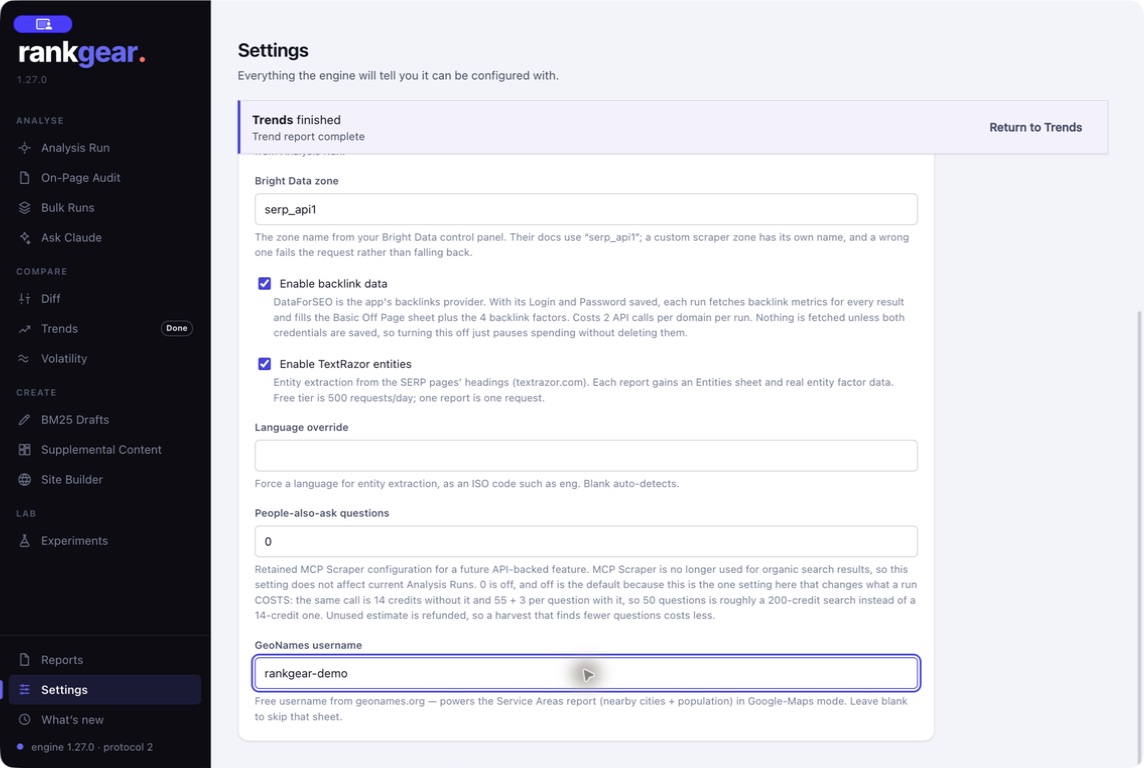
What runs where
Local by design, honest about cost
Runs on your machine
A desktop app, not a browser tab. The analysis engine is local, so long batches survive sleep, a closed laptop lid, and provider hiccups.
Your data stays local
Reports are files on your own disk — nothing is uploaded. Keys sit in a protected local store the app can only see as present.
Costs shown up front
External data runs on your own accounts, and every billable action shows its cost before you run it. No hidden metering.
Your first run
From install to a field in three steps
Install
Download RankGear for your platform from the store and open it — it runs entirely on your machine.
Connect a provider
Add at least one SERP provider key in Settings; that’s enough to start organic on-page analysis.
Run an analysis
Enter a keyword and a target page on Analysis Run and press Run. Open the score, then the Do-This-First fix.
Want the walkthrough with screenshots? See getting started.
Boundaries
What to know before you buy
Some features depend on the providers you connect — off-page and entity data, Maps, and AI all run on your own accounts. Deeper result sets (Top 100) take longer than Top 10. And RankGear measures what correlates with position on your field; it doesn’t track rankings daily like a cloud tracker.
Correlation, not causation. RankGear reports what correlates with ranking on your chosen field — it will never sell you a “rank in 30 days” promise, because that isn’t a thing anyone can honestly prove.
Questions, answered
How is RankGear distributed?
As a desktop app through the Apple App Store (macOS) and the Microsoft Store (Windows). It runs locally; you connect your own provider accounts.
Do I need paid provider accounts?
You need at least a SERP provider to fetch the field. Off-page, entity, Maps, and AI features use their own providers, on your own keys — add only what you use.
Are my API keys exposed?
No. Keys are stored in a protected local credential store; the interface receives only presence information, never the secret value.
Does it work the same on Mac and Windows?
Yes — both apps use the same shared Swift analysis and reporting engine, so measurements and artifacts stay aligned across platforms.
Get RankGear.
Download for your platform and read the field on your next keyword.
macOS 14+ (Apple silicon) · Windows 11 (x64/ARM64) · bring your own provider accounts