
Feature · Analyse
Action Planner: turn a workbook into approved, cited tasks
A report tells you what is wrong. A plan tells someone what to do on Monday. Action Planner reads one saved workbook, drafts a backlog in which every task carries the exact measurement behind it, and creates only the tasks you personally approve — in your ClickUp list.
One workbook in. Nothing else.
Point Action Planner at a folder, pick exactly one .xlsx report, and choose Claude, OpenAI or Gemini from the API keys you already hold. The provider and its cost are on screen before anything runs, and no model call happens until you press Generate recommendations.
The workbook itself is never uploaded. RankGear reads it on your computer and sends only a bounded, source-labelled extract — Details, the actionable significant Overview factors, measured competitor values, Roadmap and Results, plus whatever topical, entity, question, zone, helpful-content and AI-access evidence that run captured. Cell text is handled as untrusted data, never as instructions.
How your data stays local →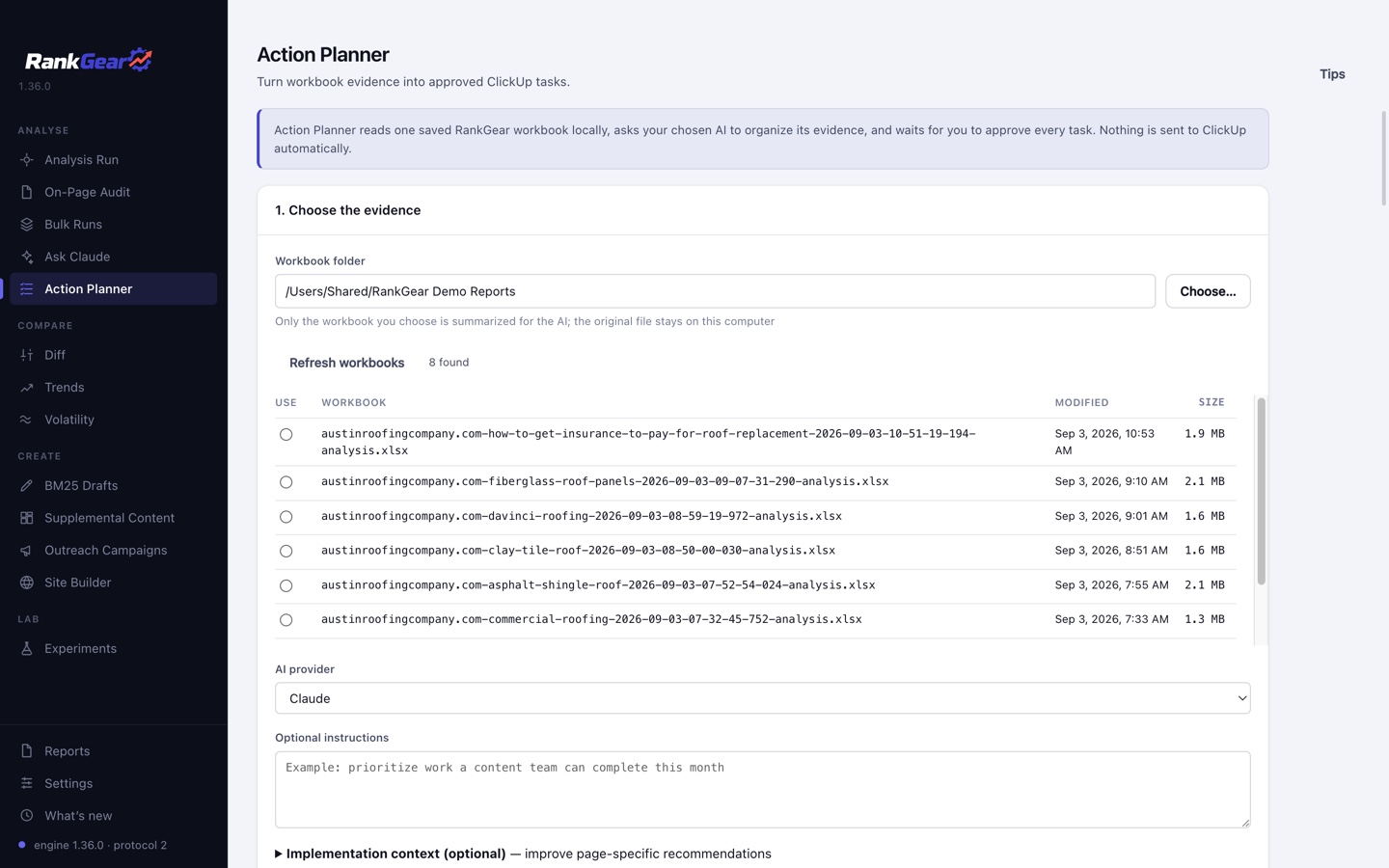
The evidence boundary
It plans from what was measured — and nothing else
Action Planner does not fetch your page. It does not fetch the ranked competitors. It never presents a fresh observation of a live page as part of the review, because it never made one. Everything it proposes is traceable to a cell in the workbook you selected.
That boundary is what makes the output checkable. RankGear validates the factor and the structured values the model returned, then writes the canonical Overview citation and current-evidence line itself — so a model’s punctuation cannot quietly rewrite a measurement, and altered or unknown evidence is rejected with the recommendation, factor, expected values and received values all named.
Generic advice fails the same validation. A recommendation that cannot point at a number does not reach your backlog.
Grading
Every task says how much weight it can carry
RankGear labels each recommendation from facts it controls — correlation strength, how widely the field adopts the factor, how deep the competitor sample is, and the size of the measured gap. The model cannot choose its own grade or inflate one.
Strong evidence
A well-adopted factor with a clear correlation and a real measured gap across a deep enough competitor sample. Work this first.
Useful lead
The measurement supports the direction, but adoption, sample depth or gap size leaves more room for judgment than a strong item does.
Needs verification
Worth a look, not worth a sprint — confirm the situation yourself before committing a team to it.
Correlation, not causation. An evidence grade describes the strength of a measured relationship in this field, not the certainty of a ranking gain. A Strong evidence task is the best-supported place to spend effort — it is not a promise.
Inside a recommendation
What a task actually contains
Each item arrives implementation-ready rather than aspirational:
- Exact numbers — the primary factor’s current value, goal and deficit, unchanged from the workbook.
- A traceable citation — the Overview row it came from, plus its other workbook sources.
- Ordered steps and subtasks, with a factor-appropriate change location.
- Phase, priority and effort, so a backlog can be sequenced rather than guessed at.
- Dependencies — RankGear rejects unknown prerequisites and cycles outright, and raises a coordination warning when two recommendations push the same page area in opposite measured directions.
- Competitor exemplars at their exact measured rank, host and value — resolved by RankGear against the workbook, and labelled for you to inspect the page yourself, because no claim is made about where on that page the value came from.
- Multiple acceptance criteria and a named RankGear rerun check, so “done” is something you can measure instead of argue about.
An optional change blueprint adds an outline, field map or markup plan a writer or developer can work from. Turning it off empties the blueprint and leaves the rest of the task intact.
Approval
Nothing is checked until you check it
Review the Delivery Plan
The technical view: workbook values, factor IDs, evidence grade, citations, competitor examples, dependencies, blueprints and editable ClickUp Markdown. Titles and task detail stay editable.
Or hand over the Client Brief
The same approved work in plain language — what was found, why it matters, the recommended action, the expected measurable outcome and how it will be verified. Factor IDs, worksheet names and ClickUp fields are hidden. Export it as HTML in the shared report design, under your own white-label footer.
Pick the ClickUp destination
Workspace, Space, optional Folder and a required List, then a checkbox per available assignee so one, several or no people are assigned — with status, due date, priority and tags.
Confirm, then create
RankGear names the destination and the exact number of checked recommendations before creating one task each. A partial send saves every receipt as it lands, so a retry skips what already arrived and repeats only what failed.
Every recommendation starts unchecked, and only checked work is eligible for the Client Brief or for ClickUp. The connection is a ClickUp personal API token you create, with a free read-only test that lists your authorized Workspaces — RankGear deliberately does not implement ClickUp OAuth.
Afterwards
Close the loop on the work you shipped
Run the analysis again once the tasks are done, then point Verify completed work at the newer workbook for the same keyword and tracked domain. Action Planner compares each factor in the plan against its own baseline and goal and sorts the outcome into Goal reached, Improved, Regressed, Unchanged or Needs verification.
Tracked-rank movement is reported separately and deliberately — RankGear shows that the rank moved without claiming your task caused it. Pair it with Diff for the full run-to-run change, and with Volatility to know whether the move was bigger than the field’s normal churn.
You can rate any recommendation — Useful, Too vague, Not applicable, Already implemented, Incorrect page location or Unsupported by evidence. Recent feedback for the same tracked domain shapes later plans as bounded preference guidance; it never becomes evidence about a page.
Boundaries
What it is — and isn’t
Action Planner is a planning layer over a run you already have. It does not measure anything new, it does not rerun your analysis, and it will not act on your behalf: no task exists in ClickUp until you approve the work and confirm the destination.
It is also honest about its own activity. A private Activity log timestamps workbook discovery, factor-allowlist preparation, the provider wait, safety validation, the local save, follow-up verification and every ClickUp submission — and states explicitly that no target or competitor page was fetched. The latest 200 events survive a restart and can be cleared; credentials and full AI responses are never written to it. The newest 25 recommendation sets are retained locally, and a running review holds the software-wide work coordinator, so other work stays read-only until it finishes.
Correlation, not causation. The plan is ordered by measured deficit against a field, not by expected ranking gain. Closing a gap makes your page more like the pages that already rank — which is where to place a bet, not a guarantee of where it lands.
Questions, answered
Does my workbook get uploaded to an AI provider?
No. The .xlsx stays on your computer. RankGear reads it locally and sends only a bounded, source-labelled extract of the relevant cells — Details, actionable Overview factors, measured competitor values, Roadmap, Results and the topical, entity, question, zone, helpful-content and AI-access evidence that run captured.
Which AI provider does it use?
Claude, OpenAI or Gemini, on the API key you already hold. The selected provider and its cost are shown before you commit, and no model call happens until you press Generate recommendations.
Can the AI invent a measurement?
No. RankGear validates the factor and the structured values it returns against the workbook, then writes the canonical citation and current-evidence line itself. Altered or unknown evidence is rejected along with the recommendation, and generic advice that cites no number fails the same check.
Does it create ClickUp tasks automatically?
Never. Every recommendation starts unchecked, you choose the Workspace, Space, Folder and List, and RankGear names the destination and the exact number of checked items before it creates anything.
Do I need ClickUp to use it?
No. The backlog, the Delivery Plan and the Client Brief all work on their own, and the brief exports as HTML. ClickUp is an optional destination for the work you have already approved.
How many recommendations do I get?
No more than eight per plan, and only ones that survive validation — the goal is a backlog a team can actually finish, not an exhaustive list of everything measurable.
Stop handing over a spreadsheet.
Turn the run you already have into eight cited, approved tasks your team can start on — and verify when they are done.
macOS 14+ (Apple silicon) · Windows 11 (x64/ARM64) · bring your own provider accounts