
Feature · Compare
Volatility: know the noise before you credit the change
Before you attribute a rank move to your edit, find out how much the SERP moves on its own. Volatility repeats the same search several times and measures how much the result set rearranges when nothing on your page has changed.
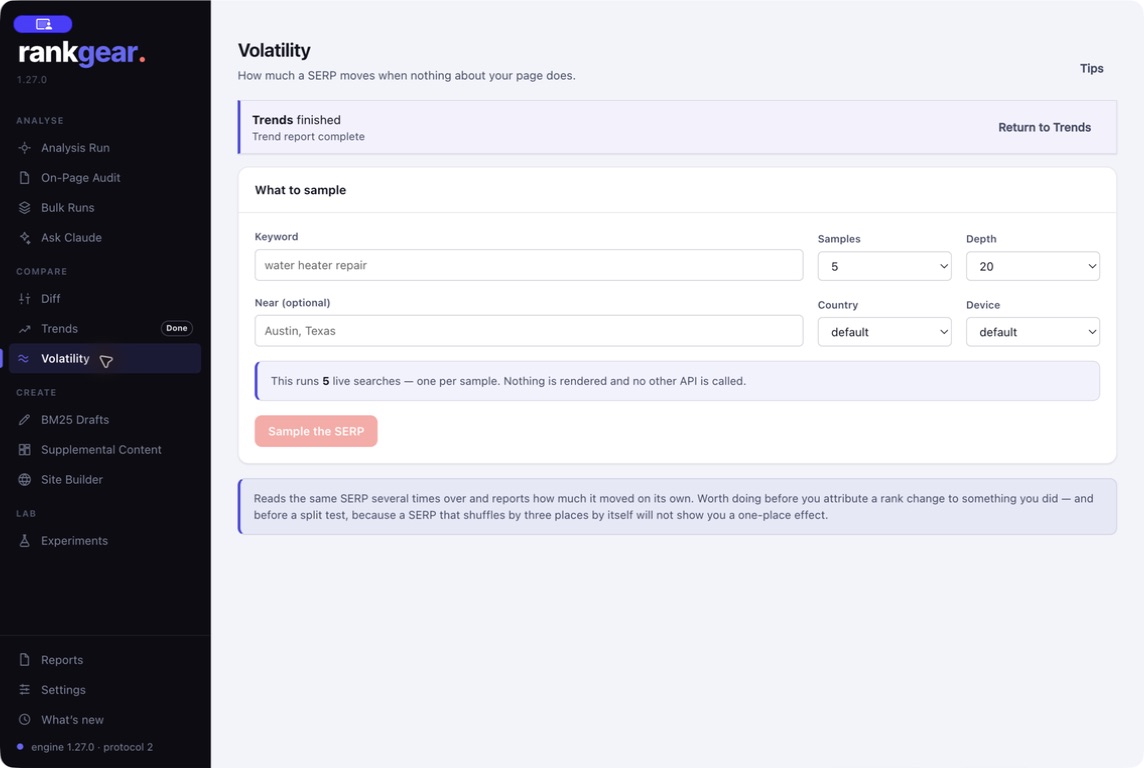
Set the sample, get a baseline
Choose the keyword and how many repeats to run. RankGear searches the same query on a loop and watches how positions rearrange between runs — without you touching your own page. The output is a plain measure of how restless this SERP is: some queries are rock-steady, others reshuffle every few minutes.
- A calm field means a rank move is more likely to mean something.
- A restless field means small moves are probably noise — wait for a bigger, sustained change.
Where it fits
The check that makes the others trustworthy
Before Diff
Run Volatility first so you know whether a rank change in Diff is bigger than the field’s normal churn.
Alongside Trends
A volatility baseline tells you which movements in Trends are signal and which are wobble.
Before you report
Never credit an edit for a SERP that was simply restless — a baseline keeps a client story honest.
Boundaries
What it is — and isn’t
Volatility samples a moment in time; a field can be calm today and restless next week, so re-baseline when it matters. More repeats give a steadier estimate but take longer and use more provider calls on your own account.
Correlation, not causation. Volatility measures how much the result set moves on its own. It sets context for interpreting a change — it is not itself a ranking signal or a prediction.
Questions, answered
How many repeats should I run?
Enough to see the field’s spread — a handful gives a rough read, more gives a steadier baseline. Each repeat is a search on your own provider account.
What does high volatility mean for my work?
It means small rank moves are probably noise. Wait for a larger, sustained change before attributing anything to an edit.
Does Volatility change my rankings?
No. It only observes how the result set moves between identical searches; it never touches your page.
Measure the noise first.
Set a volatility baseline for your keyword so every rank change you report is bigger than chance.
macOS 14+ (Apple silicon) · Windows 11 (x64/ARM64) · bring your own provider accounts